
A win-back email should give customers a reason to return – not make them feel guilty for leaving. Start with one customer group, check its usual buying cycle, and offer one clear next step.
This guide includes 50 subject lines and seven short email templates for U.S. small businesses. The subject lines cover three situations:
- Customer inactivity: Reconnect after a missed visit, order, or renewal.
- Past purchases: Suggest a reorder, related item, or service at the right time.
- Reasons for leaving: Address price, service problems, missing options, or too many emails.
Before sending, check customer details, resolve open complaints, and honor email preferences. Then test a short sequence of two or three emails, measuring purchases, bookings, replies, and profit – not opens alone.
The guide also covers unsubscribe rules, when to stop sending, and when financing larger retention projects may make sense. Start with relevance, not a discount.
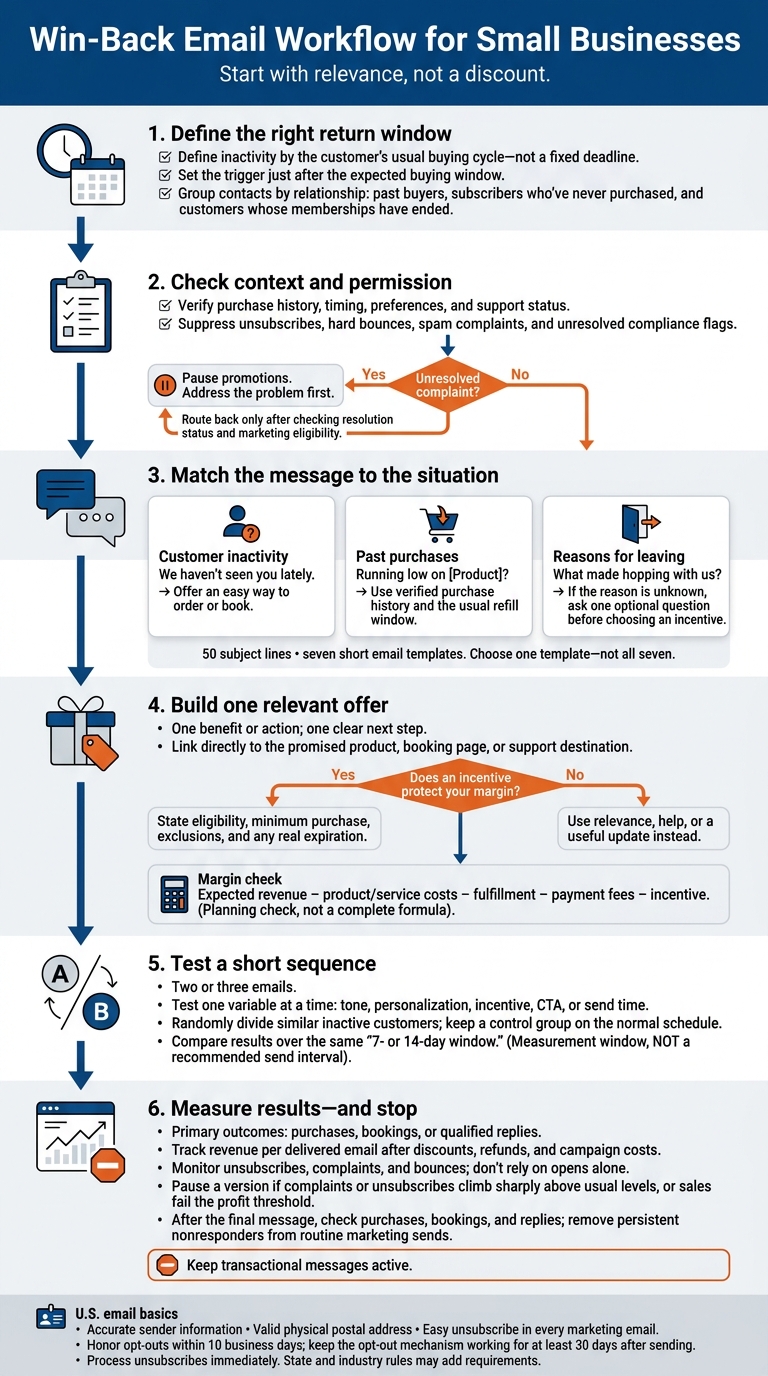
Win-Back Email Workflow for Small Businesses
How to Build Omnisend Winback Flows That Bring Customers Back
sbb-itb-1eb586e
Before You Send: Define Inactivity and Check Customer Context
Before choosing a subject line, check what inactivity means for each contact list – and where each customer stands.
Define inactivity by your buying cycle, not a fixed deadline. Measure the time between completed orders, renewals, or appointments.
Six months without a renewal may signal a lapsed monthly subscription, while six months between seasonal services may be normal.
Set your trigger just after the expected buying window.
Group contacts by relationship: past buyers, subscribers who’ve never purchased, and customers whose memberships have ended. Check their last completed transaction, product category, returns, subscription status, and stated preferences. Pause promotional emails for anyone with an unresolved refund, delivery problem, or support ticket. Address the problem first so your subject line and offer fit the customer’s situation.
Don’t rely on opens alone to label someone inactive. Apple Mail Privacy Protection can download tracking images before someone reads an email, inflating recorded opens. Use purchases, renewals, bookings, replies, and clicks as your main signals. Track “no recent purchase” separately from “no engagement.”
Use only verified, current details. If data is missing or uncertain, choose neutral fallback copy. Keep unnecessary purchase details out of the subject line.
Before sending, check marketing eligibility and preferences. Suppress contacts with unsubscribes, hard bounces, spam complaints, or unresolved compliance flags. Under CAN-SPAM, include accurate sender information, a valid physical postal address, and an easy opt-out. Honor opt-outs within 10 business days, and keep the opt-out mechanism working for at least 30 days after sending. State and industry rules may add requirements.
1. Customer inactivity
Match each subject line to how long the customer has been inactive and an offer you can deliver.
- We haven’t seen you lately – Reach customers who’ve recently gone quiet with a link to order or book.
- Ready for your next visit? – Make booking easy for recently lapsed service customers with a direct link.
- A quick hello from our team – Reintroduce your brand to quiet subscribers without leading with a discount.
- See what’s new since your last visit – Give longer-lapsed customers a reason to return by showing what you’ve added to your products or services.
- Something new for your next order – Feature one new arrival for customers who’ve passed their usual reorder window.
- Need a hand getting started again? – Offer help to users who’ve stopped logging in, and invite them to reply.
- Your next visit, with less waiting – Invite lapsed customers back with a clear way to save time.
- A useful guide for your next project – Reconnect with customers who buy infrequently through helpful content rather than a hard sell.
- Still looking for your next favorite? – Send inactive shoppers a short selection of relevant recommendations.
- Thanks for being a regular – Recognize former regulars with a warm invitation to return.
- Come back with free shipping – Use only when your margins allow it, and spell out exclusions in the email.
- A $10 thank-you for coming back – Give lapsed customers a modest incentive to return, and explain any minimum purchase.
- Let’s catch up – consultation included – Invite inactive service clients to a free consultation, with clear limits on what it covers.
- Openings still available this week – Use only if you have openings this week.
- Ready for the season ahead? – Contact seasonally inactive customers before their usual buying period, with a link to book or shop.
- What would make coming back worthwhile? – Ask longer-inactive customers one simple question, and invite a reply.
- Would you like to keep hearing from us? – Save this for your final re-engagement email. Include preference options, and stop sending to people who don’t respond.
Next, pair the best subject line with one of the short templates below.
2. Past purchases
Use these subject lines when a customer has bought from you and the next email should reflect their last order or reorder cycle. Let purchase history guide what you suggest – and when you send it.
- Running low on [Product]? – Send after the usual refill window, not simply after a set period of inactivity.
- Time for your next [Service]? – Base the timing on the customer’s previous service schedule.
- Your usual order is ready – Link to the exact size, flavor, or version previously purchased.
- Keep your [Product] working its best – Share maintenance guidance relevant to the product’s age and use.
- Complete your [Product] setup – Recommend a compatible accessory that makes the original purchase more useful.
- A better fit for your [Product] – Explain why the suggested item works with what the customer already owns.
- You bought [Product] – try this next – Suggest a related product, not an unrelated bestseller.
- A new version of your favorite [Product] – Highlight a verified improvement, such as better durability or added features.
- Your [Product], now in more sizes – Show newly available sizes relevant to the previous order.
- Your holiday favorite is back – Target past seasonal buyers only when the item is available again.
- Get ready for summer with [Product] – Send before the customer’s usual seasonal buying window.
- Time to update your cash flow forecast – Offer past business-plan buyers a projection refresh when their figures need updating.
- Reorder your favorite in one click – Use only if the link genuinely supports a one-click reorder.
- Need help choosing your next [Product]? – Offer guidance when an exact repeat purchase may not suit the customer.
- A thank-you offer for your next [Product] – Reward past buyers with a relevant offer and clear terms.
- Need a replacement for your [Product]? – Suggest a suitable replacement only when purchase history supports the timing.
- How’s your [Product] working out? – Invite feedback before recommending another purchase, especially when satisfaction is unknown.
Next, pair the best-fitting subject line with one of the short templates below.
3. Reasons for leaving
Match the subject line to why the customer left. Address their specific concern rather than sending everyone the same offer.
- Easier on your budget for business loans. – For price concerns, link to a lower-cost option rather than offering everyone a discount.
- Sorry about your last experience. – Address documented service problems with an apology and a direct support contact.
- Can we make this right? – For unresolved complaints, offer a clear path to a refund, repair, or replacement.
- We made changes based on your feedback – Contact dissatisfied buyers only after verifying the specific product improvement.
- Not the right fit? Let’s find another option – Help customers choose a suitable alternative based on their stated concern.
- The feature you asked for is here – Notify customers whose feedback identified a missing feature; show how to use it.
- Clearer delivery dates before you order – Address shipping uncertainty with delivery estimates customers can check before paying.
- Would local pickup help? – Offer available pickup to customers who cited shipping costs.
- We fixed the checkout issue. – Send only after testing the reported issue in the affected checkout flow or payment method.
- Canceling is simple. Returning is optional. – For subscription cancellation complaints, make the cancellation and renewal terms clear.
- Has what you need changed? – Invite customers to update their preferences instead of pushing their previous purchase.
- A better gift idea for next time. – Reach confirmed gift buyers whose previous choice missed the mark with a more suitable option, not a personal refill reminder.
- Only shop once a year? That’s fine. – Let shoppers who left because reminders were too frequent choose an annual schedule.
- More options in the category you wanted. – Address limited selection by linking to relevant additions, not the entire catalog.
- Fewer emails, only what interests you – Give overwhelmed subscribers frequency and topic controls, plus an easy unsubscribe option.
- What made you stop shopping with us? – When the reason is unknown, ask one optional question before choosing an incentive.
Seven Short Email Templates You Can Adapt
Pick a subject line that fits the customer’s history, then use one template – not all seven. Include only verified details and a direct link to the right destination.
Purpose Subject Body Friendly check-in [First name], how have you been? It’s been a little while since your last visit to [Brand], and you’re welcome whenever the timing is right. If [Customer goal] is on your list, explore [Relevant option] here: [Link]. New product or service update Meet [New product], now at [Brand] Since your last visit, we added [New product] to help with [Customer goal]. See whether [Specific benefit] fits your needs: [Link]. Reorder reminder Time to reorder [Product]? If you’re running low on the [Product] you ordered, check current availability and reorder here: [Link]. Feedback request What could [Brand] have done better? How could your experience with [Product or service] have been better? Reply with the one thing we should improve. Return incentive Come back for [Discount]% off at [Brand] Use [Code] for [Discount]% off eligible purchases through [End date] at [Time] [Time zone]. Minimum purchase and exclusions apply. Redeem here: [Link]. Preference update Would you like different updates from [Brand]? Your interests or schedule may have changed. Choose the topics and frequency that fit: [Preference link]. Final re-engagement Should we pause your [Brand] emails? We’re checking whether you still want [Specific content or benefit] from [Brand]. Confirm by [Date] to keep receiving marketing emails; otherwise, we’ll pause marketing: [Confirmation link].
Choose the template based on the customer’s situation: mild inactivity, a new benefit, a valid reorder window, a complaint you can fix, a real incentive, preference control, or a final opt-in check.
The link should deliver what the email promises. Send retail shoppers to the relevant product, professional-service clients to the consultation page, and appointment customers to the booking calendar.
For incentives, spell out the actual eligibility rules, minimum purchase, exclusions, and expiration. Use clear U.S. formatting, and include a deadline only when it’s real:
December 15, 2026, at 11:59 p.m. ET
Include standard sender information and an unsubscribe link in every marketing email, even if it also includes preference or confirmation links. Honor opt-outs within 10 business days. Pause marketing only; keep transactional messages, such as order confirmations and service notices, active.
Next, match the subject line, template, and link to the customer’s last purchase, complaint, or inactivity window.
How to Choose the Right Subject Line for Your Small Business
Match the customer’s latest trigger to the least pushy subject line from the lists above that you can back up.
Start with the trigger: no purchase, no visit, canceled service, unresolved complaint, or low engagement. Record the trigger, date, and confidence level in the customer record.
Then check the last purchase or service date, usual buying interval, category interests, and stated preferences. Use those details to narrow the 50 lines to the safest match. Choose the angle first, then the offer:
| Customer situation | Recommended subject-line angle | Tone | Personalization | Incentive |
|---|---|---|---|---|
| Recently inactive | Check in or ask preferences | Friendly | First name, stated interests | Not initially |
| Beyond normal buying cycle | Share an update or confirm interest | Helpful, low-pressure | Last service or purchase category | Only with a clear business case |
| Approaching refill window | Make reordering easy | Helpful | Verified product and timing | Usually unnecessary |
| Documented unresolved problem | Address the issue first | Accountable | Confirmed issue and resolution status | Only as part of the remedy |
| Unknown reason for leaving | Offer a benefit or ask for feedback | Curious, helpful | Known interests | Try without a discount first |
Once you’ve chosen an angle, use the shortest template that fits the offer. Keep the subject focused on one benefit or action.
Use a refill angle only when you know both the product and the timing. For canceled services, check the recorded cancellation reason first. If there’s no reason on file, ask – don’t invent one.
An unresolved problem comes before a promotion. Check the support record and resolution status before sending. Make it easy for the customer to reply. Offer a refund, replacement, or credit only when it directly addresses the problem.
Treat discounts as a margin decision. Subtract product or service costs, fulfillment, payment fees, and the incentive from expected revenue. Shipping offers and upgrades cost money, too. Start without a discount when appropriate, and judge any incentive by profitable reactivation – not just whether it brings in an order.
Test, Measure, and Know When to Stop
Before you fund your retention efforts, test whether your sequence brings customers back.
Test one variable at a time: tone, personalization, incentive, CTA, or send time. Randomly divide similar inactive customers into groups, keeping a control group on the normal schedule. Small samples can point you in a direction, but they don’t prove a result. Repeat winning tests before changing your standard approach, and judge results by revenue, reactivations, and opt-outs.
Set purchases, bookings, or qualified replies as your primary goal. Track revenue per delivered email after discounts, refunds, and campaign costs. Monitor unsubscribes, complaints, and bounces, too. Compare results over the same 7- or 14-day window, and treat opens only as a rough signal.
Decide when to stop before you send. Pause a version if complaints or unsubscribes climb sharply above your usual levels, or if sales don’t meet your profit threshold. Use deadlines only when an offer expires. Don’t reset countdowns or keep extending a supposedly final promotion.
Treat the final check-in as final. After the promised last message, check purchases, bookings, and replies before removing persistent nonresponders from routine marketing sends. Process unsubscribes immediately.
Funding Larger Retention Improvements
Most win-back campaigns don’t require borrowing. But if your tests show promise, financing may help pay for larger retention upgrades, such as automation, CRM tools, inventory, equipment, or added service capacity. Before you borrow, itemize the costs and build a 12-month cash-flow forecast.
Businesses expanding retention efforts that already work can review SBA50K for guidance on SBA microloans up to $50,000, lender connections, application help, and business-plan support. These loans come from SBA-approved nonprofit intermediary lenders – not the SBA directly. Approval, terms, and eligible uses depend on the lender and program rules. Confirm that your planned expense qualifies before adding it to your plan.
Conclusion: Give Customers a Relevant Reason to Return
Start with one customer segment, a matching subject line, and a short template. Before sending, check that your data is verified, your timing fits the normal buying cycle, and your email offers one clear next step.
Give customers one useful reason to return. If poor service drove them away, explain the fix and what changed before asking for another order. Offer an incentive only when the incremental revenue covers its cost and protects your margin.
Stop the sequence after two or three sends. Don’t keep chasing people who haven’t responded, and include a clear unsubscribe option.
FAQs
How far apart should I send win-back emails?
The provided search results don’t say how long to wait between win-back emails. They only cover SBA microloan requirements, business plan development, and application support.
How short should my subject lines be?
Keep win-back email subject lines short so readers can see them in full on mobile and notice them at a glance. Character limits vary by email client, so stick to one clear value proposition or call to action.
How can I measure sales caused by win-back emails?
Track conversions across your sales channels and tie win-back emails to actual sales receipts. Log when payments arrive and link each one to the email campaign that drove the sale. This bottom-up approach shows how campaigns contribute to revenue. Use that data in your financial projections to account for their role in bringing in new customers and driving repeat purchases.
Leave a Reply